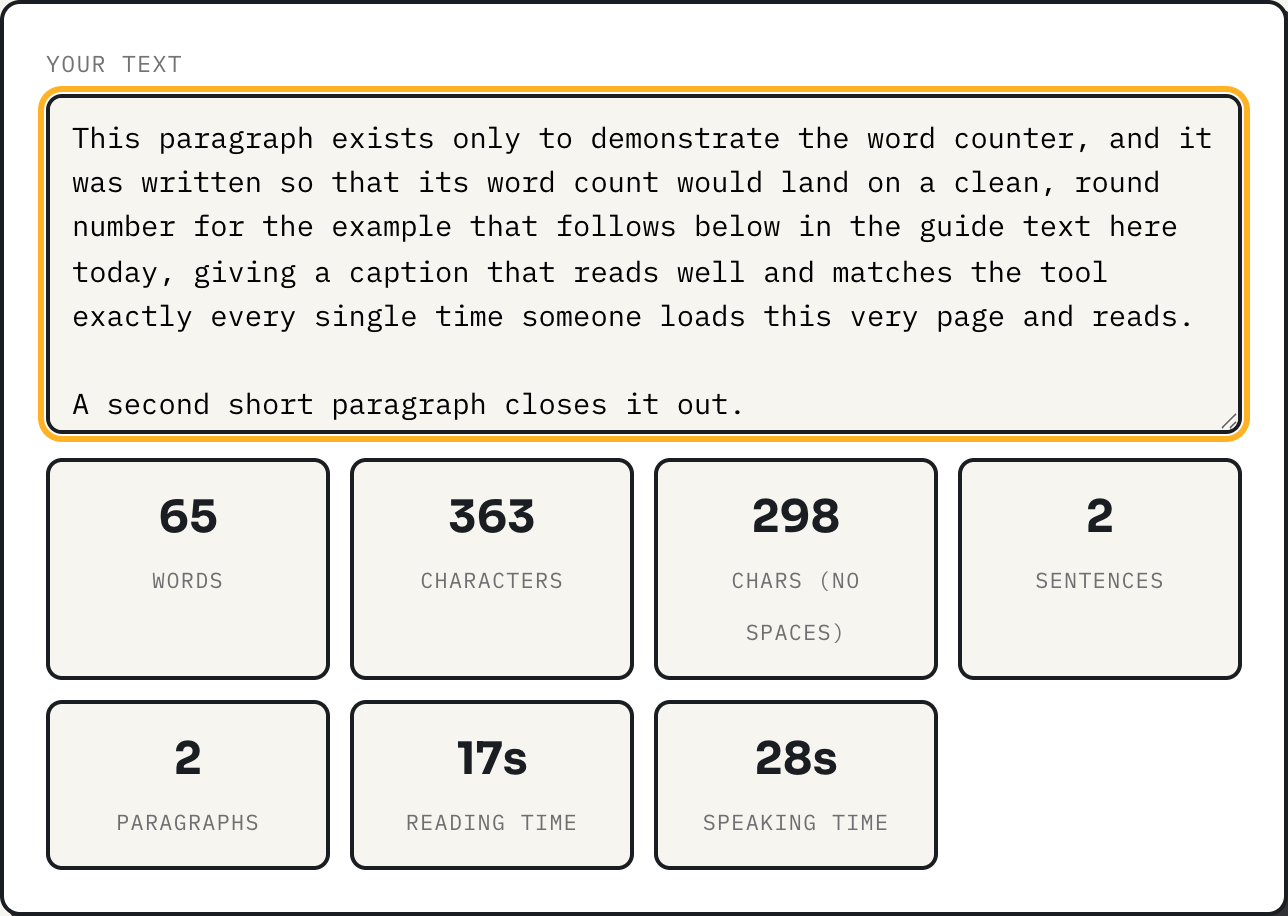
The word counter answers three questions at once: how many words is this, how long will it take to read, and how long will it take to say out loud. All three numbers come from the same short piece of JavaScript running in your browser, and none of them are guesses pulled from a study. They are arithmetic on a word count, using two fixed rates the tool states up front: 225 words per minute for reading, 140 words per minute for speaking. This guide shows exactly how those numbers are produced, what counts as a word in the first place, and how a companion tool, word frequency, turns the same word list into a ranked list of what a text actually leans on.
What counts as a word
The counter matches any run of letters or numbers, optionally joined by an apostrophe or a hyphen, as one word. That single rule handles the two cases that trip up a naive space-split: a hyphenated compound like "well-known" stays one word instead of two, and a contraction like "author's" keeps its apostrophe instead of breaking into "author" and "s". The pattern is Unicode-aware, meaning it recognizes letters beyond plain ASCII, so accented words and non-Latin scripts count as words rather than getting chopped at every accent mark. Sentences are counted differently: any run of text ending in a period, question mark, exclamation mark, or ellipsis closes a sentence, and text with no terminal punctuation at all still counts as one sentence rather than zero. Paragraphs are blocks separated by a blank line; a single line break within a block is just a line break.
A worked example
Paste the two short paragraphs from the screenshot above and the counter reports 65 words, 363 characters, 298 characters with spaces removed, 2 sentences, and 2 paragraphs. Reading time comes out to 17 seconds, speaking time to 28 seconds. Those two numbers are just the word count divided by the tool's rate, converted to seconds when the result is under a minute: 65 divided by 225 is 0.29 minutes, which is 17.3 seconds, rounded down to 17. Sixty-five divided by 140 is 0.46 minutes, 27.9 seconds, rounded to 28. Once the total passes a minute, the display switches to a minutes-and-seconds format instead of a raw second count.
Sizing a speech to a time slot
Speaking time is the number people underuse. If you know how long you have at a podium, you know how long your script should be, at the tool's 140 words per minute pace:
| Time slot | Words at 140 wpm |
|---|---|
| 1 minute | 140 |
| 3 minutes | 420 |
| 5 minutes | 700 |
| 10 minutes | 1,400 |
| 20 minutes | 2,800 |
Write toward the number for your slot, then paste the draft into the counter and watch the speaking-time readout climb as you add. When it crosses your target, stop writing and start cutting instead of padding further.
Sizing a document to a reading time
The same arithmetic runs the other way for anything meant to be read, not spoken, at 225 words per minute:
| Words | Reading time | Speaking time |
|---|---|---|
| 300 | 1m 20s | 2m 9s |
| 600 | 2m 40s | 4m 17s |
| 1,200 | 5m 20s | 8m 34s |
| 2,500 | 11m 7s | 17m 51s |
| 5,000 | 22m 13s | 35m 43s |
Notice the two columns never agree. A 1,200 word blog post reads in five and a third minutes but would take eight and a half minutes to deliver as a talk, because speaking is slower than silent reading by design here. Mixing the two up is the most common estimating mistake, and it is exactly what having both numbers on screen at once prevents.
Finding the words a text leans on
The word counter tells you how much text there is. The word frequency counter tells you what it is made of. It lowercases the text, pulls out runs of letters (numbers are dropped entirely, unlike the word counter), strips stray leading or trailing apostrophes, and then, by default, filters out roughly 50 common English function words like "the" and "and" before ranking what remains by count. Paste a short paragraph that repeats "counter" and "live" three times each, for instance, and with the default filters (stop words on, minimum length 3) the stats line reads 48 words total, 24 remaining after filtering, 18 distinct, with "counter" and "live" tied for first at 3 occurrences each, 12.5 percent of the filtered total apiece. That percentage is the useful number: it is share of meaningful words, not share of the whole text, so a word that would look unremarkable in a raw count can turn out to be a genuine tic once function words are out of the way.
How the tool does it
Everything above happens with a couple of regular expressions and division, entirely in the page's JavaScript. The word-matching pattern uses Unicode property escapes, a JavaScript regex feature that matches character categories like "any letter" or "any number" instead of a fixed ASCII range, which is why accented and non-Latin words are not mangled. There is no server round trip anywhere in this guide: the counter and the frequency tool both recompute on every keystroke inside your browser, and nothing you paste into either one is ever transmitted or stored.
Where the estimates stop being reliable
Both rates, 225 words per minute for reading and 140 for speaking, are fixed assumptions built into the tool, not measurements of you. Dense technical writing reads slower than casual prose, and a rehearsed presenter often speaks faster than an unrehearsed one, so treat both readouts as planning numbers, not promises. The sentence count is purely punctuation-based, so "Dr. Smith arrived." registers as two sentence boundaries instead of one, and dialogue-heavy writing with lots of short lines will read as more sentences than a person would count by hand. The word frequency tool has its own gap: there is no stemming, so "run", "runs", and "running" are three separate rows even though a person reading the list would recognize them as one idea, and the stop word list is English only and cannot be edited.
What to do
- Know your rate before you write: 140 words per minute for a spoken slot, 225 for something that will be read.
- Use the table above to set a word-count target before drafting, not after.
- Paste a finished draft into the word counter and let the live reading and speaking times tell you which one your piece actually needs to fit.
- Run long drafts through word frequency with the default filters on, and treat any word above roughly 2 percent of the filtered total as a candidate for cutting.