Word & Character Counter
Paste or type below. Counts update live and your text never leaves this page.
How to use the counter
- Paste your text into the box, or just start typing; the field is focused when the page loads.
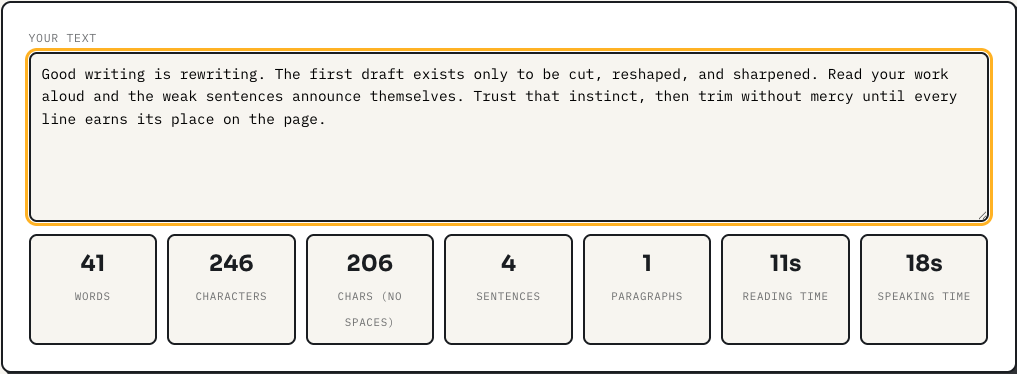
- Watch the seven stats update live on every keystroke: words, characters with and without spaces, sentences, paragraphs, and estimated reading and speaking time.
- Edit in place. Trimming to a limit is easiest when the number you are chasing updates as you delete.
There is no submit button because there is nothing to submit. The counting runs in your browser and the text never leaves the page.
A worked example
Paste a 500 word college essay draft. The counter reports 500 words, a reading time of 2m 13s at the 225 words per minute silent-reading rate, and a speaking time of 3m 34s at a 140 words per minute presentation pace. That speaking figure is the one people underuse: if you have a five minute speaking slot, this tool tells you your script should be around 700 words, and you can watch the estimate climb as you write toward it. Try the sentence "The well-known author's essay ran long." and you will see it counted as six words, because hyphenated compounds and apostrophes hold a word together here, matching how word processors count rather than a naive split on spaces.
How the counts are computed
Words are matched with a Unicode-aware pattern: any run of letters or numbers, optionally joined by apostrophes or hyphens, counts as one word. Unicode-aware matters more than it sounds, since accented characters and non-Latin scripts count correctly instead of splitting words apart. Sentences are runs of text ending in a period, question mark, exclamation mark, or ellipsis; text with no terminal punctuation at all still counts as one sentence rather than zero. Paragraphs are blocks separated by blank lines, so a single newline is a line break, not a new paragraph. Both character counts are shown because limits disagree: social platforms and most form fields count spaces, while some essay and translation word-limit conventions do not.
Honest limitations
The sentence count is punctuation-based, so abbreviations like "Dr. Smith" register as an extra sentence boundary, and dialogue-heavy fiction will read slightly high. Reading and speaking times are averages for adult English readers; dense technical material reads slower than 225 words per minute and a nervous presenter speaks faster than 140, so treat the times as planning estimates, not promises. There is no keyword density, no grade-level score, and no autosave: refreshing the page erases your text, which is the price of a tool that stores nothing. Copy your work back out before you close the tab.
Frequently asked questions
How are words counted?
Any run of letters, numbers, or apostrophes separated by spaces or punctuation counts as one word. Hyphenated compounds like "well-known" count as one word, matching how most word processors count.
How is reading time estimated?
Reading time uses 225 words per minute, a common average for adult silent reading. Speaking time uses 140 words per minute, a comfortable presentation pace.
Does character count include spaces?
Both are shown: characters including spaces (what Twitter/X and most limits use) and characters excluding spaces (common for essays and translations).
Is my text stored or sent anywhere?
No. Counting happens in JavaScript in your browser. The text is never uploaded, logged, or saved, and refreshing the page erases it.