Markdown is plain text with a small set of typed symbols that a program turns into formatted HTML, an asterisk pair for bold, a hyphen for a list item, a pound sign for a heading. The Markdown previewer renders those symbols live as you type, so instead of memorizing the syntax you can watch it work. It was designed in 2004 by John Gruber, and the specification he published is still online at daringfireball.net; the version most tools implement today, including this one for its supported core, follows the community specification at CommonMark. The appeal is that the source stays readable even before it is rendered: a Markdown file looks like normal typed notes, unlike HTML source, which is why READMEs, changelogs, and forum posts settled on it.
A worked example
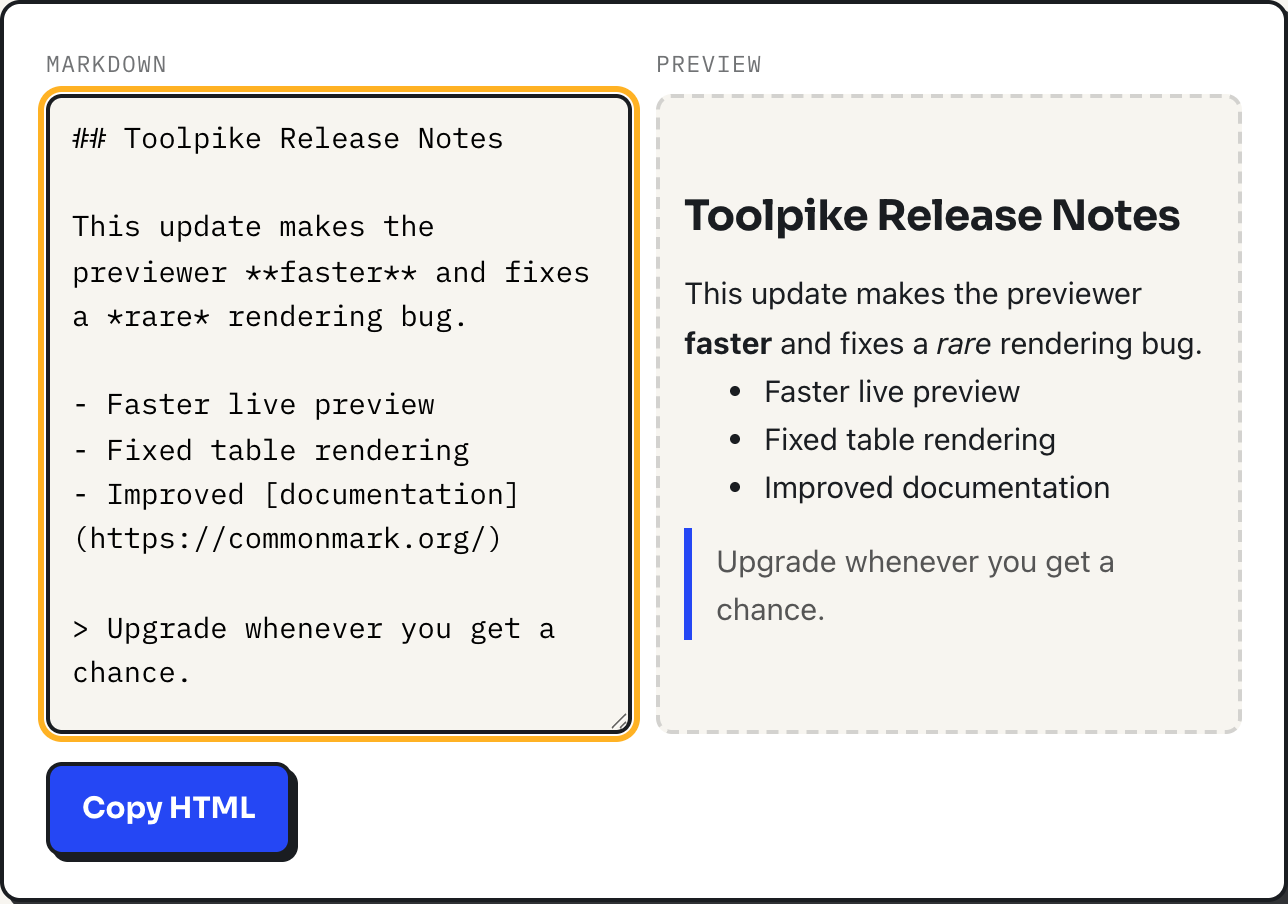
Type the release note in the screenshot above: a heading marked with two pound signs, a sentence with one word wrapped in double asterisks and another in single asterisks, a three-item bulleted list with a link on the last item, and a line starting with a right angle bracket. The right pane renders, in order: an <h2> heading, a paragraph with <strong> around "faster" and <em> around "rare", a <ul> with three <li> items, an <a> tag around "documentation" carrying rel="nofollow noopener", and a <blockquote>. Click Copy HTML and that exact markup is on your clipboard, ready to paste into a CMS or an email template.
The syntax this previewer supports
| Type this | You get |
|---|---|
## Heading | <h2>Heading</h2> (one to six # marks, h1 to h6) |
**bold** | <strong>bold</strong> |
*italic* | <em>italic</em> |
`code` | <code>code</code> |
[text](url) | a link, opened with rel="nofollow noopener" |
 | an image, capped at 100% width |
- item | a bulleted list (*, +, or - all work) |
1. item | a numbered list |
> quoted | a blockquote |
--- | a horizontal rule (three or more - or * alone on the line) |
| triple backtick fence | a preformatted code block, unhighlighted |
a header row, then a | --- | --- | divider row | a bordered table |
How the renderer decides what a line is
This is a small purpose-built renderer, not a wrapped library. It reads the input one line at a time and checks each line against a fixed order of patterns: a code fence first, then a blank line, then a heading, then a horizontal rule, then a blockquote, then a list, then a table (which requires the very next line to be a dashes-and-pipes divider), and only if none of those match does the line join a plain paragraph. Consecutive plain lines with no blank line between them merge into one paragraph, which is standard Markdown behavior but surprises people coming from a plain text editor where every line break shows: to force a visible break, leave a blank line between lines. Before any of that pattern matching happens, the whole input is HTML-escaped, so if you paste a real <script> tag it displays as literal text in the preview instead of running.
The table rule that trips people up most
A pipe table needs its header row followed immediately by a divider row made of dashes and pipes, such as | --- | --- |. Type a header row and a data row with no divider between them, like | A | B | followed directly by | 1 | 2 |, and the previewer does not recognize a table at all; each line becomes its own separate paragraph, pipes and all, shown as literal text. That single missing row is the cause of a broken table nine times out of ten, and the fix is always the same: add the divider line right under the header.
What this renderer does not do
It covers the everyday core of Markdown and stops there. Nested lists render flat: an indented sub-item under a bullet loses its indentation and becomes a sibling item at the same level, rather than a nested <ul> inside an <li>. Wrapping a word in _ _ instead of asterisks does nothing here: only asterisks produce bold and italic, and text written with that other symbol stays as plain, literal text. Reference-style links, the kind defined once at the bottom of a document and referenced by name elsewhere, are not supported, nor is strikethrough, nor task list checkboxes. Fenced code blocks render as plain preformatted text with no syntax highlighting. For a README or a blog post, that covers what you actually type most days; for a document that leans on deep nesting, footnotes, or reference links, a full CommonMark implementation is the better tool.
Where it fits
Because the preview and the Copy HTML output run entirely in your browser, this is a reasonable place to draft an unannounced release note, an internal doc, or a comment reply before it exists anywhere permanent. Nothing you type is uploaded. It is not a place to write a long-form document with footnotes and cross-references, and it is not a syntax-highlighted code editor; use it for the short, structured pieces of writing that Markdown was built for in the first place.
What to do
- Use the previewer to check unfamiliar syntax before you commit to it in a real document.
- If a table will not render, check for a missing or malformed divider row directly under the header first.
- Use asterisks, not the _ symbol, for bold and italic in anything you plan to paste in here.
- Leave a blank line between anything you want to appear on its own line; a single line break just continues the paragraph.
- Click Copy HTML once the preview looks right, and review the markup before publishing it, the same way you would review any generated code.