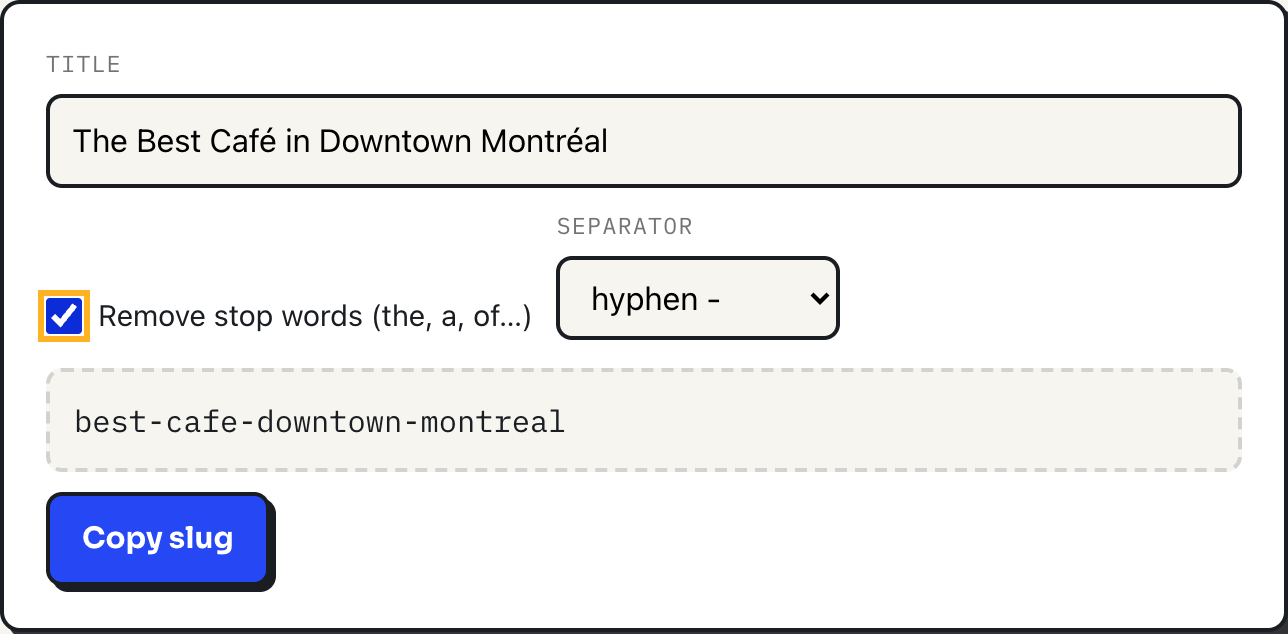
A slug is the part of a URL that comes after the domain and identifies one page in words rather than numbers, the "chocolate-chip-cookies" in a link that could instead have been "post?id=8231". The rules for a good one are short and mostly agreed on, and the slug generator applies every one of them automatically: paste a title in, watch it get lowercased, stripped of accents and punctuation, and joined with hyphens as you type.
This guide lays out those rules, shows exactly what the generator does to a real title, and covers where a slug and a programming-style identifier, like the kebab-case the case converter also produces, stop being the same thing.
The rules, and why each one exists
| Rule | Why |
|---|---|
| All lowercase | Some servers treat "Post" and "post" as different URLs. Lowercase avoids the ambiguity and looks consistent everywhere it is pasted. |
| Words joined with hyphens | A hyphen reads as a word break at a glance. Google's own guidance on URL structure recommends hyphens over the alternative for exactly this reason. |
| No accents or diacritics | é, ñ and ü render fine in a modern browser, but plenty of older tools, scripts and copy-paste paths still mangle them. Plain letters are the safe subset. |
| No spaces or symbols | Spaces become %20 once a URL is encoded, which is exactly the ugly, unreadable string a slug exists to avoid. |
| Short, meaningful words only | A slug is read by people, not just parsed by servers. Filler words add length without adding information. |
Underneath all of it is a narrower technical rule: letters, digits, hyphens, dots, the _ character and tildes are the "unreserved" characters defined in RFC 3986, the specification for URI syntax, meaning they never need percent-encoding. Everything else in a slug, from spaces to accented letters, either gets encoded into an ugly escape sequence or silently breaks something downstream. Sticking to the unreserved set is not a style preference; it is the only subset of characters guaranteed to survive every link shortener, chat client and spreadsheet a URL might pass through.
A worked example
Type "The Best Café in Downtown Montréal" into the slug generator with its default settings and the output is:
the-best-cafe-in-downtown-montrealTick "Remove stop words" and it tightens to:
best-cafe-downtown-montrealThree things happened in that second pass. The accented é in Café and the é in Montréal were both transliterated to a plain e. "The" and "in" were dropped because they are on the tool's stop word list. And "downtown" survived, because it is not filler, it is one of the two words that actually distinguishes this page from every other café review.
How the generator gets there
The title is first run through Unicode NFKD normalization, which decomposes an accented letter like é into a plain e plus a separate combining accent mark, and the marks are then stripped out in one pass. That single step is what handles é, ñ, ü and most European diacritics without a manual lookup table for every possible character. Smart quotes and straight apostrophes are deleted outright rather than turned into hyphens, which is why "I'd" becomes "id" and not "i-d". Everything that is not a lowercase letter or digit then becomes a word boundary, the stop word list (34 common English words such as "the", "a", "of" and "in") is applied if you asked for it, and the words are joined with whichever separator you picked. One safeguard is worth knowing: if removing stop words would wipe out the entire title, the way it would for something like "What Is It About You", the tool keeps the original words instead of handing back an empty slug.
A slug is not the same thing as kebab-case
The case converter produces kebab-case too, and for straightforward text the two tools agree. But they solve different problems, and one difference matters for URLs specifically: the case converter's word-splitting regex treats an apostrophe as part of a word rather than punctuation to discard. Run "Nathan's Coffee Shop" through its kebab-case button and the result is nathan's-coffee-shop, apostrophe intact. Run the same title through the slug generator and the apostrophe is gone: nathans-coffee-shop. An apostrophe is not in the unreserved character set, so a URL built from the case converter's output would need it percent-encoded, which is precisely the ugly outcome a slug is meant to avoid. For file names, JavaScript variables and CSS classes, reach for the case converter. For anything that goes in a URL, use the slug generator, which was built to drop exactly the characters a URL cannot carry cleanly.
Where the rules bend
Transliteration only reaches as far as accented Latin letters. Cyrillic, Greek, Arabic and CJK text is not converted, it is simply dropped, so a title with no Latin characters at all produces an empty slug; that case needs a language-specific transliterator, not this tool. The stop word list is English only, so "le" in French or "el" in Spanish will survive the filter untouched. There is no length limit either, so a 20-word headline produces a 20-word slug; in practice four to six meaningful words is the range that stays readable in a shared link without wrapping. And no slug tool can tell you whether the result is already taken on your own site, since that answer lives in your CMS, not in the text you typed.
What to do
- Write the slug before you write the URL: paste the working title into the generator, tick "Remove stop words," and see what survives.
- Keep the separator on hyphen unless a filename or code identifier specifically needs a
_instead. - Aim for four to six words that would make sense read aloud, not the full headline.
- If a title relies on non-Latin script, transliterate it by hand first; the generator will not do that step for you.
- Set the slug once and keep it. If a page's title changes later, update the visible heading and leave the URL alone, or add a redirect if it truly must change.