Comparing two drafts by eye is how small edits slip through: a changed number in the middle of a long clause, a deleted sentence that leaves no visible gap. The diff checker pastes both versions side by side and highlights exactly which lines were added, removed, or left untouched, so nothing depends on a careful re-read. It works on lines, the same unit git diff uses, which is a deliberate tradeoff explained below. A second tool, text sorter, is useful before a comparison too, for cleaning up list-shaped documents so the diff reflects real changes instead of reordering or stray whitespace.
What a line diff actually computes
The tool splits both texts into lines and finds the longest common subsequence, the largest set of lines, in the same relative order, that appear in both versions. Every line in that shared set is marked unchanged. Everything else is either an addition (only in the new text) or a removal (only in the old text). This is exactly the algorithm behind git diff at its core, which is why the output reads the same way: red minus lines, green plus lines, grey unchanged lines.
A worked example
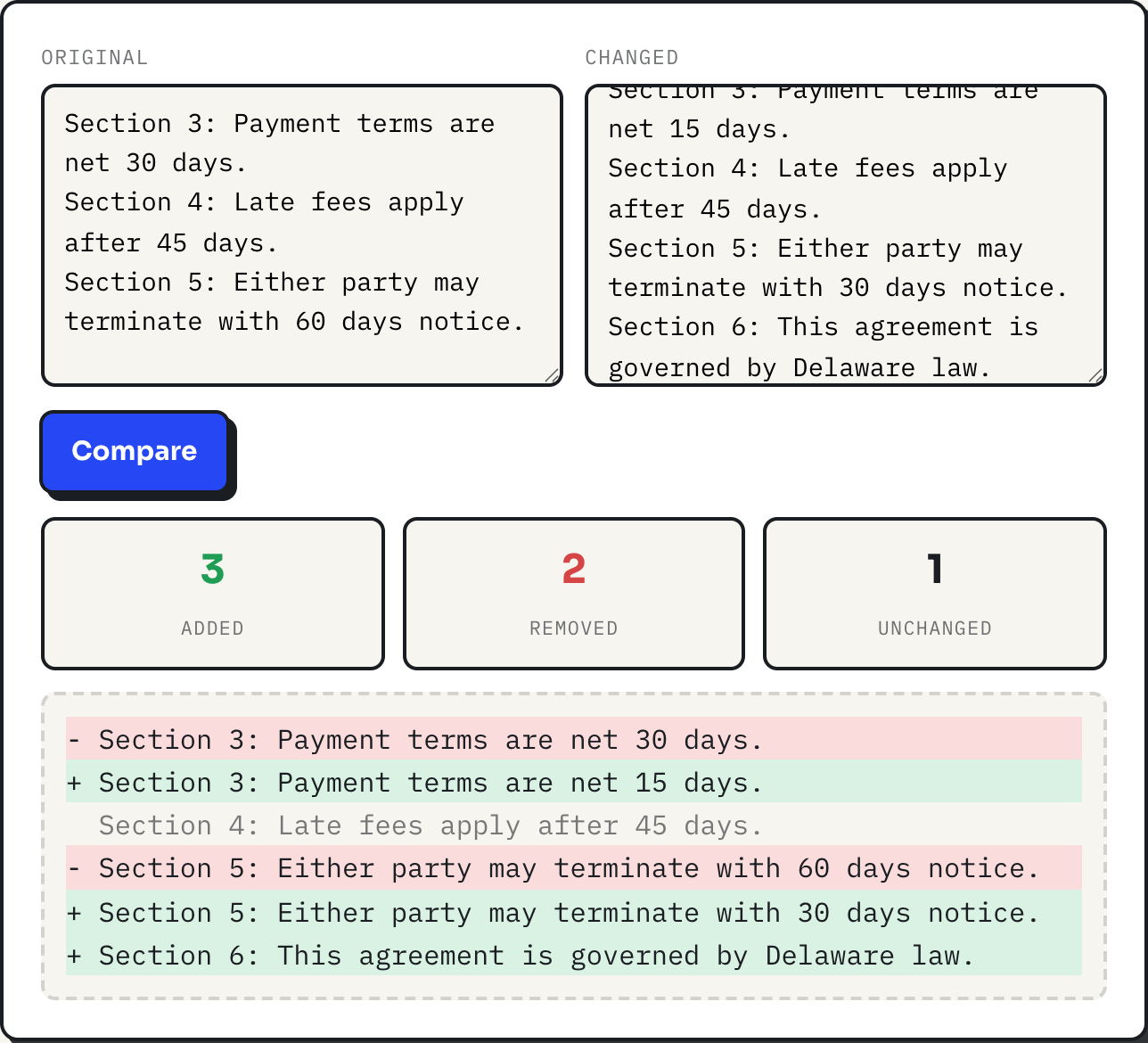
Take the two three-line contract excerpts in the screenshot above. Line 3 changes a payment term from 30 days to 15. Line 4 is untouched. Line 5 changes a notice period from 60 days to 30, and the changed version adds an entirely new governing-law clause at the end. Comparing them produces:
| Line | Result |
|---|---|
| Section 3, net 30 days | removed |
| Section 3, net 15 days | added |
| Section 4, late fees | unchanged |
| Section 5, 60 days notice | removed |
| Section 5, 30 days notice | added |
| Section 6, governing law | added |
Stats: 3 added, 2 removed, 1 unchanged. Notice that an edited line never shows as one line with the changed word highlighted; it shows as the old whole line removed and the new whole line added, stacked together. That is the line-based tradeoff: you always know which line changed, but a one-word edit inside a 40-word line still displays as two full lines.
Why the algorithm never misaligns unrelated lines
Because the LCS is computed over the whole document rather than matched position by position, inserting or deleting a line does not throw off everything after it. In the example above, Section 4 stays unchanged even though it sits at a different line number relative to the new Section 6 at the end. A position-by-position comparison would have flagged every subsequent line as different the moment one line was inserted; the LCS approach only flags what actually differs.
Cleaning a list before you diff it
Diffs are position-sensitive: two lists with the same items in a different order look completely different to a line diff, even though nothing was really added or removed. Before comparing two versions of a plain list, such as a client roster or a set of tags, run each one through text sorter first, so both are alphabetized the same way and only genuine additions or removals show up as changes. The sort is locale-aware and case-insensitive, so "apple" and "Apple" land together, and it is numeric-aware, so item2 sorts before item10 instead of after it. Trim spaces and remove blank lines before deduping, in that order: a line with an invisible trailing space is a different line to a computer, and deduping before trimming would leave both copies in place. Dedupe itself keeps the first occurrence of each line and preserves whatever order the list is currently in, which is what makes it safe to run before a sort rather than only after.
How text sorter's stats confirm the cleanup
Paste six lines, "Beta", "alpha", "Beta" with a trailing space, "gamma", a blank line, and "alpha" again. The stats line under the buttons starts at "6 lines, 5 non-empty, 4 unique," because the trailing-space copy of Beta counts as a different line from the exact string. Running the cleanup in order changes that line at each step:
| Action | Lines | Non-empty | Unique |
|---|---|---|---|
| Paste (before cleanup) | 6 | 5 | 4 |
| Trim spaces | 6 | 5 | 3 |
| Remove blank lines | 5 | 5 | 3 |
| Remove duplicates | 3 | 3 | 3 |
| A → Z | 3 | 3 | 3 |
Trimming first drops the unique count from 4 to 3, because the trailing-space Beta now matches the plain one. Only then does Remove duplicates have a clean pair to collapse, and the final A to Z pass lands on alpha, Beta, gamma. Two versions of a list cleaned this way and then compared in the diff checker will show only real membership changes, not whitespace noise or ordering differences.
Where a line diff stops being the right tool
The comparison table in diff.js costs memory proportional to the product of both line counts, so the tool refuses pairs beyond roughly 4 million cell comparisons, which is about two 2,000-line documents, and tells you to compare smaller sections instead. There is no word-level or character-level highlighting inside a changed line, and no option to ignore whitespace or letter case, so a document that got reformatted, with every paragraph rewrapped, will show as almost entirely changed even when the words are identical. For prose specifically, putting one sentence per line before pasting both versions turns the line-level diff into something close to a sentence-level one. And the sorter's Shuffle button uses plain Math.random, fine for randomizing a list but not something to rely on for a comparison workflow that needs reproducible order.
What to do
- Paste the older version into Original and the newer one into Changed, then click Compare and read the stats line first.
- For a list-shaped document, run both versions through text sorter, trim then dedupe then sort, before diffing, so only real changes show.
- If a whole document lights up as changed, suspect reformatting, not content, and try comparing smaller sections or a one-sentence-per-line version.
- Keep documents under roughly 2,000 lines per comparison; split longer ones by section.