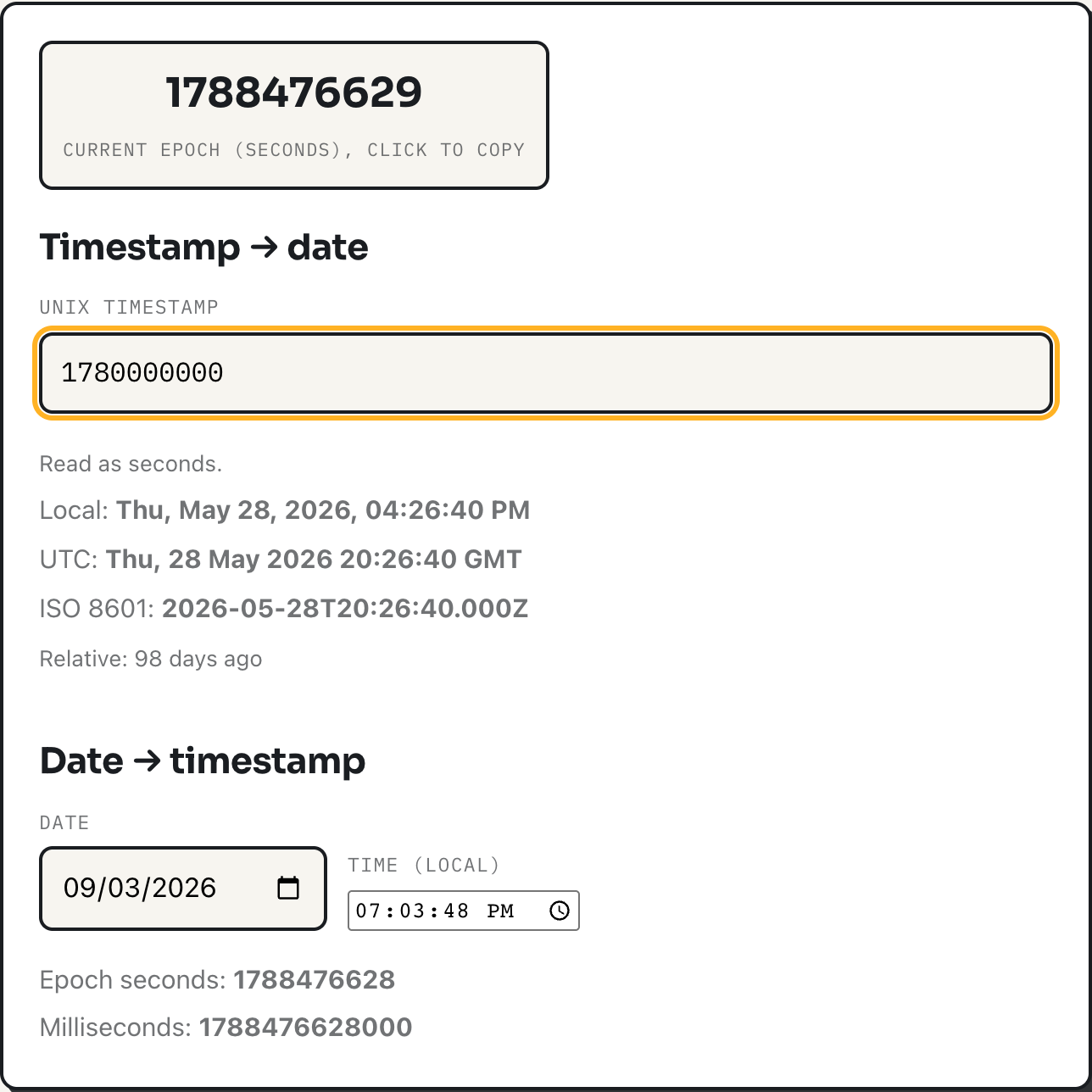
A Unix timestamp is a count of seconds elapsed since midnight UTC on January 1, 1970, a moment programmers call the epoch. It has no time zone, no daylight saving flag, and no calendar attached to it: it is just a number, which is exactly why computers pass it around instead of a formatted date string. The timestamp converter turns that number back into something readable, in both directions, and the two questions people actually get stuck on are whether a given number is seconds or milliseconds, and what happens when the count runs out of room in 2038.
Both questions have precise answers. Length tells you which unit you are looking at, and arithmetic tells you exactly when the 2038 rollover happens and why it does not affect most systems still running today. The rest of this walks through both, along with what the converter is actually doing when you paste a number into it.
Seconds or milliseconds: count the digits
Seconds-based timestamps for anything happening now are ten digits long, and will stay ten digits until the year 2286. Milliseconds-based timestamps are three digits longer, since a millisecond count is a thousand times the seconds count. The tool's rule, taken straight from its code, is a single threshold: any value whose absolute size is greater than 99,999,999,999 (eleven digits) is treated as milliseconds; anything at or below that is treated as seconds.
That threshold is not arbitrary, it is the largest eleven-digit number, chosen because it cleanly separates the two formats for every date a person is likely to type in. The table below shows what the same digit counts mean on each side of the line, computed by applying the tool's own rule.
| Value | Digits | Read as | Resolves to (UTC) |
|---|---|---|---|
1780000000 | 10 | seconds | Thu, 28 May 2026 20:26:40 |
1780000000000 | 13 | milliseconds | Thu, 28 May 2026 20:26:40 (same instant) |
9999999999 | 10 | seconds | Sat, 20 Nov 2286 17:46:39 |
99999999999 | 11 | seconds (at the threshold) | Wed, 16 Nov 5138 09:46:39 |
100000000000 | 12 | milliseconds (just past it) | Sat, 03 Mar 1973 09:46:40 |
The last two rows are the point worth sitting with. Two values that differ by a single digit, 99999999999 and 100000000000, get read completely differently: one as a seconds count landing in the year 5138, the other as a milliseconds count landing in 1973. That flip is not a bug, it is what happens whenever a format is inferred from length rather than stated explicitly, and it is the reason the tool always tells you which interpretation it picked.
A worked example, both directions
Paste 1780000000 into the timestamp field. Ten digits, read as seconds, and the result shows three readings at once: your local time, the UTC time (Thu, 28 May 2026 20:26:40 GMT), and the ISO 8601 form, 2026-05-28T20:26:40.000Z. Now paste 1780000000000, the same instant expressed in milliseconds. Thirteen digits crosses the threshold, the tool reports "Read as milliseconds," and it lands on the identical date. That confirms the two numbers describe the same point in time in two different units, which is the whole relationship between seconds and milliseconds timestamps.
Going the other way, pick a date and a time in the lower half of the tool and it returns the epoch value in both units at once, seconds and milliseconds, so you never have to do the multiplication by hand. The time you type there is read as your machine's local time, the same way "9am" means something specific only once you know which time zone you meant.
Why a timestamp has no time zone
This is the part that trips people up conceptually more than the digit counting does. A Unix timestamp counts seconds since a fixed instant, UTC midnight at the epoch. It is a single number describing a single point on a single timeline shared by every clock on earth. "Time zone" only enters the picture when that point gets displayed to a person, because 1780000000 seconds after the epoch is 20:26 in London and 13:26 in New York, at the same instant. The number itself does not change: only the label put on it for a particular reader does.
The converter's local-time reading comes from the browser's own Date object, which reads the operating system's time zone and daylight saving rules directly. No time zone database is bundled with the page or guessed at; it defers entirely to whatever the visiting machine is set to, which is also why the UTC and ISO 8601 readings are included alongside it: they are the two representations that mean the same thing on every machine, which makes them the ones worth pasting into a bug report or a log line.
The year 2038 problem
Some older systems store a Unix timestamp as a signed 32-bit integer rather than a 64-bit one. A signed 32-bit integer can hold values up to 2,147,483,647 before it overflows. That number of seconds after the epoch is Tuesday, January 19, 2038, at 03:14:07 UTC. One second later, a system still using 32 bits wraps around to a negative number and reads the date as sometime in 1901 instead of 2038, the same kind of failure that hit the older, unrelated year-2000 date bug.
Almost nothing built in the last two decades is exposed to this. Modern operating systems, databases and the 64-bit integers JavaScript's Date is built on all have room for timestamps far beyond 2038, in JavaScript's case up to roughly the year 275,760. The risk is concentrated in older embedded systems and file formats that were written when 32 bits was the standard integer size and never revisited. The Wikipedia article on the year 2038 problem has a longer list of the specific formats and systems still affected, if you need to check one.
How the tool decides, and what it does not do
Everything happens in the browser using the JavaScript Date object; nothing is sent anywhere. The seconds-versus-milliseconds decision is the digit threshold described above, applied every time the input changes. The relative-time phrase underneath the three readings, things like "in 4 hours" or "2 days ago," comes from the browser's built-in Intl.RelativeTimeFormat, and it rounds to the largest sensible unit, capping at days, so a timestamp a year away reads as "in 365 days" rather than "in 1 year."
Two limits are worth knowing before you rely on it. First, this is not a time zone converter: it shows your local time and UTC, not what a timestamp reads as in Tokyo, unless your machine happens to be set to Tokyo time. Second, auto-detection cannot be overridden; a genuine seconds value past the year 5138 (more than eleven digits) would be misread as milliseconds, which only matters for dates far outside any practical use.
Where it stops being the right tool
The converter is built for the single lookup: what does this timestamp mean, what is the timestamp for this date, right now. It does not accept free-form date text like "next Tuesday," only what the date and time inputs produce, and it converts one value at a time rather than a column of them. For bulk conversion, or for parsing timestamps out of log files by the thousand, reach for your language's own date library instead, where the same seconds-versus-milliseconds and UTC-versus-local decisions apply but at scale.
What to do
- Count the digits before trusting a raw number: 10 is seconds for any date this century, 13 is milliseconds for the same range.
- When logging or sharing a timestamp with someone in another time zone, share the UTC or ISO 8601 form, not your local reading.
- If a system you maintain still stores time as a 32-bit integer, plan its replacement before January 19, 2038, not after.
- Use the converter for one-off checks; use a date library for anything that touches more than a handful of values.