A regular expression, regex for short, is a pattern that describes text instead of listing it out. Instead of searching for the literal string "555-123-4567", you can write a pattern that matches any string shaped like a phone number, and use the same pattern on a thousand documents. It looks intimidating on first sight, mostly because a handful of punctuation marks are doing a lot of work in a small space. The regex tester lets you build one a piece at a time and watch it match live, which is the fastest way to learn it: type a symbol, see what lights up, adjust.
This guide covers the symbols that cover most everyday searches, not the entire specification. JavaScript regex, which is what runs in every browser and what the tester uses, is close enough to the regex in Python, PHP and most other languages that these patterns will transfer directly.
What a regular expression actually is
A regex is not a programming language. It has no variables or loops. It is a compact way of saying "match this shape": a digit, then a digit, then a digit, then a dash, and so on. Two things make it powerful. First, most symbols mean "one character of some category" rather than one specific character, so \d matches any digit and \w matches any letter, digit or _. Second, a handful of quantifier symbols say how many times the thing before them can repeat, so you rarely write out a shape character by character.
The symbols that cover most everyday searches
These are the ones worth memorizing first. The tested example in the third column was run through Python's regex engine, which matches JavaScript on syntax this basic, so you can trust it and also try each one in the tester yourself.
| Symbol | Meaning | Tested example |
|---|---|---|
\d | a single digit | \d matches "2" in "Room 2" |
\w | a letter, digit or _ | \w+ matches "cat5" in "cat5!" |
\s | a single whitespace character | a\sb matches "a b" |
. | any character except a line break | c.t matches "cat" |
* | zero or more of what came before | \d* matches "42" in "42" |
+ | one or more of what came before | \d+ matches "42" in "Room42" |
? | makes what came before optional | colou?r matches both "color" and "colour" |
{n,m} | between n and m repeats | \d{2,4} matches "2026" in "2026" |
^ and $ | start and end of the string (or line, with the m flag) | ^Room matches "Room" only at the very start of "Room 12" |
\b | a word boundary, the edge between a word character and anything else | \bcat\b matches "cat" in "cat category", not the "cat" inside "category" |
[...] | a character class: any one character listed inside | [aeiou] matches "e" in "hello" |
| | alternation, either side | cat|dog matches "dog" in "I have a dog" |
(...) | a capture group, remembers what matched inside it | (\d{3})-(\d{4}) captures "123" and "4567" from "123-4567" |
A worked example: pulling a phone number apart
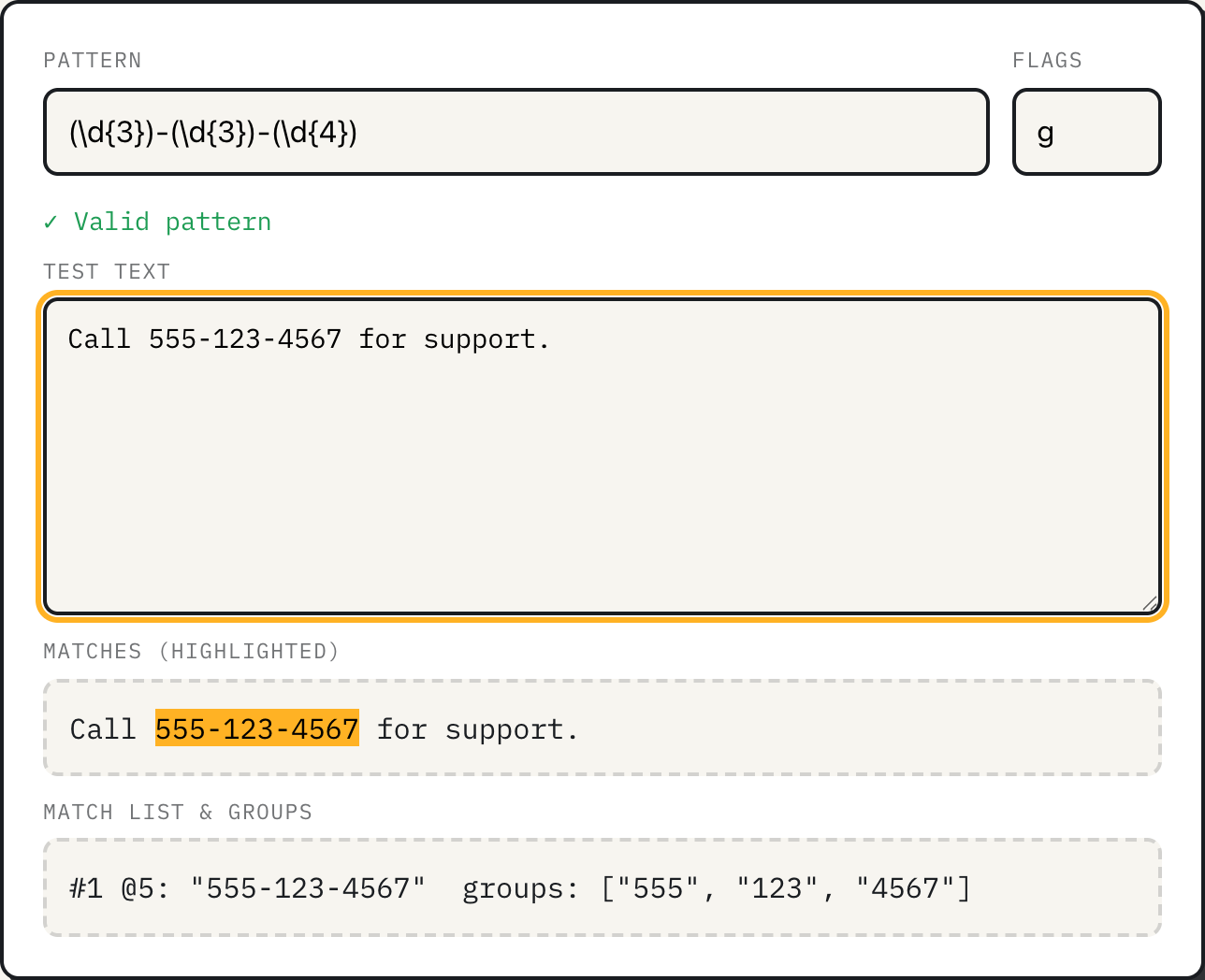
Combine four of those symbols into (\d{3})-(\d{3})-(\d{4}) and set the test text to "Call 555-123-4567 for support." Paste that pattern into the tester and the number highlights immediately, with the match list underneath reading:
#1 @5: "555-123-4567" groups: ["555", "123", "4567"]The @5 is the character offset where the match starts, counted from zero, so the C, a, l, l and space before it account for the first five positions. Each pair of parentheses in the pattern becomes one entry in the groups list, in order, which is what lets code (or you, reading the output) pull the area code out separately from the rest of the number.
Two more patterns worth keeping
Dates in ISO form follow the same idea: \d{4}-\d{2}-\d{2} matches "2026-09-14" and "2026-09-21" in "Meeting on 2026-09-14, follow-up 2026-09-21." Add parentheses around each group of digits, as the tool's own default pattern does, and you can pull the year, month and day apart the same way.
For emails, the tester loads with \b[a-z0-9._%+-]+@[a-z0-9.-]+\.[a-z]{2,}\b and the flag i already in place, matching against sample text that includes both a couple of valid-looking addresses and one deliberately broken one. Run it and only the two real-looking addresses highlight; the broken one has no dot after the @ and the pattern requires one. That is the shape of the whole approach: build a pattern that matches the shape you actually care about, and let the shape do the filtering.
Flags go in their own field. g finds every match instead of stopping at the first, i ignores uppercase versus lowercase, and m makes ^ and $ match at each line break instead of only at the very start and end of the whole text.
How the tester runs your pattern
The tester builds your pattern with JavaScript's own RegExp constructor, so what highlights is exactly what your own JavaScript code would match, not an approximation. A few details from how it is built are worth knowing. The g flag is effectively always active internally, because highlighting every match on the page requires it, even if you left it out of the flags field; if you need first-match-only behavior, read just the #1 line in the list rather than relying on the flag. A capture group that is present in the pattern but did not match anything, because it sat inside an unmatched alternative, shows as ∅ rather than an empty pair of quotes, which is a useful signal when you are debugging an optional group. Matching stops after 5,000 matches so a pattern against a huge block of text cannot lock up the page, and a match of zero length, which some patterns can produce, advances the search by one character instead of looping in place forever. When a pattern will not compile, the message shown is the browser's own parser error, prefixed with a red mark, which usually names the exact character that broke it rather than a vague "invalid pattern".
Where regex stops being the right tool
The email pattern above, and most patterns you will find online, are deliberately loose. Fully matching every address the email standard allows takes a pattern long enough to fill a page, and even a perfect pattern only checks shape, not whether the mailbox exists. Treat a matched address as plausible, not confirmed, and verify anything that matters by sending mail to it. Regular expressions also cannot reliably match nested structures of arbitrary depth, such as correctly balanced parentheses or properly nested HTML tags, because that requires keeping track of how deep you are, which a regex pattern has no memory for. And a pattern with nested quantifiers can be pathologically slow against the wrong input, since the match cap in this tester limits how many successful matches it keeps, not how long the engine is allowed to search; if a pattern makes the tab stop responding after an edit, that pattern needs to be simplified before it goes anywhere near production code.
What to do
- Start from the symbol table and build a pattern one piece at a time in the tester, watching the highlight update on every keystroke rather than writing the whole thing blind.
- Wrap whole-word patterns in
\bso a search for "cat" does not also light up "category". - Treat the flags field as part of the pattern. A missing
ion a case-sensitive search is the most common reason a pattern silently matches nothing. - Before a pattern goes into real code, test it against the empty string and against text with no match at all, not just the example that made you think it worked.
- When the shape you need is nested or country-specific, such as balanced brackets or international phone formats, reach for a parser or a library instead of stretching a regex further.