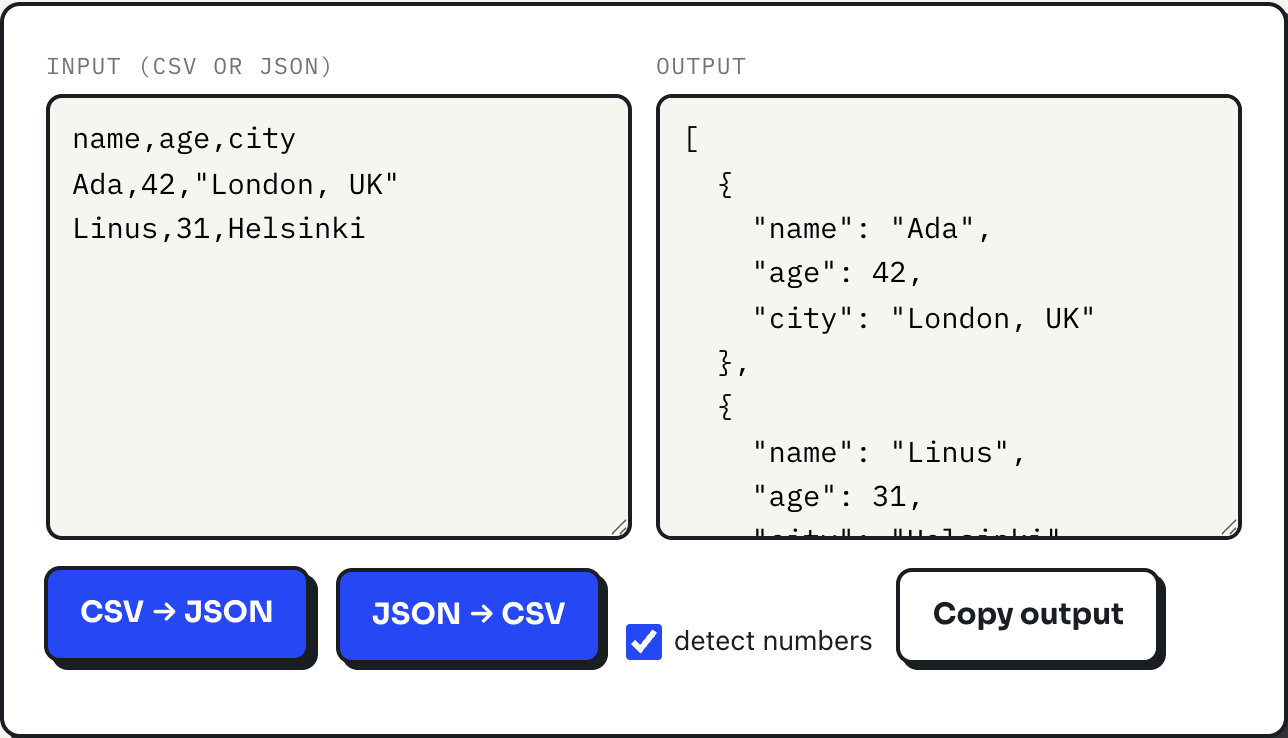
Most broken CSV imports trace back to one missing pair of quotes. A comma sitting inside a value that was never wrapped in double quotes gets read as a column separator, which shifts every field after it one column to the right, or drops the extra value entirely. The CSV to JSON converter follows the quoting rules laid out in RFC 4180, the closest thing CSV has to a specification, so the way it behaves is the way a correctly quoted file is supposed to behave everywhere.
Spreadsheet programs that export CSV generally apply these same quoting rules on the way out. The trouble shows up when a file was hand-edited, generated by a script that skipped quoting, or exported by something that only quotes some of the time. Knowing the three cases that require quotes is enough to fix almost any broken import, and the converter is a fast way to check whether a file was quoted correctly before it goes anywhere important.
The three cases that require quotes
RFC 4180 requires a field to be wrapped in double quotes whenever it contains any of three characters: the delimiter itself, a double quote, or a line break. Outside of those three cases, quoting is optional.
| Raw value | Why it needs quotes | Correctly quoted field |
|---|---|---|
| London, UK | contains the delimiter (a comma) | "London, UK" |
| 3" nail | contains a literal double quote | "3"" nail" |
| say "hello" now | contains two literal double quotes | "say ""hello"" now" |
The quote-inside-a-quote rule is the one people forget: a literal double quote inside a quoted field is written as two double quotes in a row, not escaped with a backslash. 3"" nail between the outer quotes means the single character " followed by nail, not two separate quote marks.
A line break inside a value follows the same wrapping rule. This is legal, RFC-4180 CSV, one field spanning two lines:
notes
"first line
second line"
A parser that only reads a full text line per row will break on that file, since the newline inside the quotes is not the end of the record. A parser that respects quoting reads it as a single field containing a line break.
A worked example, broken and fixed
Take a three-column file where the city value contains a comma but was never quoted:
name,age,city
Ada,42,London, UK
Linus,31,Helsinki
Run that through the converter and the header row promises three columns, but Ada's data row produces four values once it is split on every comma: Ada, 42, London, and UK. The converter builds each JSON object by walking the header keys against the row values in order, so the fourth value has nowhere to go and is silently dropped. The result is {"name": "Ada", "age": 42, "city": "London"}, quietly missing "UK" with no error raised, which is the dangerous part: a misquoted file does not always fail loudly.
Wrap the city value in quotes and nothing else changes:
name,age,city
Ada,42,"London, UK"
Linus,31,Helsinki
Now the row parses as exactly three fields, and the result is {"name": "Ada", "age": 42, "city": "London, UK"}, the comma preserved inside one value instead of splitting it. The header row and the second row were never the problem; only the one unquoted field with a comma in it was.
How the converter parses CSV
The parser reads the input one character at a time rather than splitting on commas or newlines, which is what makes it possible to honor quoting at all. A double quote toggles whether the parser is inside a quoted field; while inside one, commas and line breaks are read as literal characters that belong to the value, and a doubled quote is read as one literal quote rather than closing the field. Both Windows-style line endings (carriage return followed by newline) and Unix-style line endings (newline alone) are recognized as row breaks when they fall outside a quoted field.
Converting the other way, from JSON back to CSV, the tool takes an array of objects and builds the header row from the union of every key it finds across all of them, in the order each key was first seen, so objects with slightly different fields still produce one rectangular table with blanks where a key is missing. Any cell whose value contains a comma, a quote, or a newline gets quoted on the way out, with embedded quotes doubled, which is the same rule run in reverse. A nested object or array inside a JSON value is serialized as a JSON string inside its cell rather than expanded into more columns, since CSV has no way to represent nested structure.
Where it stops being the right tool
The delimiter is a comma, full stop. A file that uses semicolons, common from spreadsheet exports set to a European locale, or tabs, will not be recognized: every field on a row will parse as one giant unbroken value, since there is no comma to split on. Convert the delimiter to a comma first, carefully, watching for commas that were already inside quoted values, or re-export the file with a comma delimiter if the source application allows it.
Number detection has its own trap. It relies on JavaScript's own idea of what looks numeric, so a zero-padded code like 007 becomes the number 7, and a long numeric identifier can lose precision the same way any JSON number can. For ID columns, columns of codes, or anything where leading zeros or exact digit strings matter, uncheck "detect numbers" and keep every value as a string. There is also no streaming: a file larger than the browser tab can hold in memory will fail rather than convert in chunks, and JSON input has to already be an array of flat-ish objects, not a deeply nested API response, which needs flattening before it will produce a sane table.
What to do
- Quote any field that contains a comma, a double quote, or a line break; nothing else needs quoting.
- Write a literal double quote inside a quoted field as two double quotes in a row, never a backslash.
- If a converted row looks short a column, suspect an unquoted comma in the source file before anything else.
- Turn off "detect numbers" for identifier columns, and check the delimiter is a comma before trusting a semicolon- or tab-heavy export.
- Run the file through the converter as a quick check before importing it somewhere that will not tell you a value went missing.