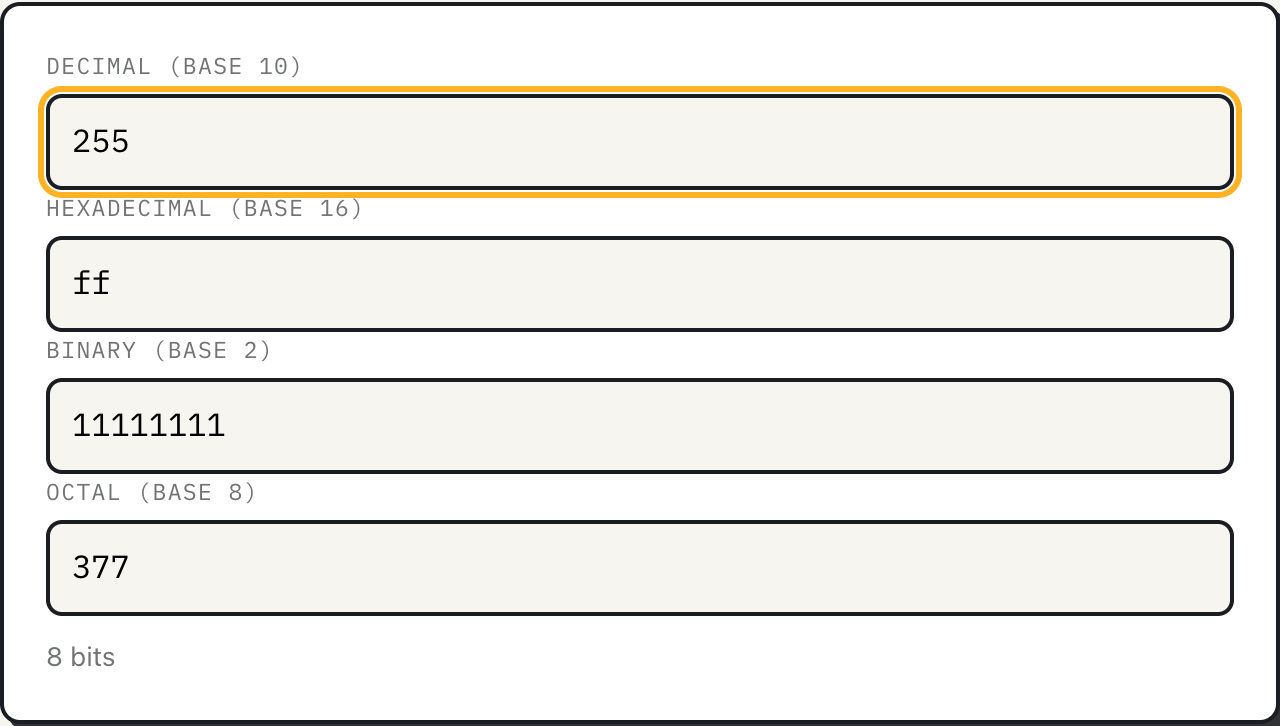
Computers store everything as binary, strings of 1s and 0s, but a raw binary number is painful for a person to read: thirty-two digits of ones and zeros do not group into anything the eye can hold. Hexadecimal and octal exist purely to compress binary into something readable, without changing the underlying value at all. The base converter keeps decimal, hex, binary and octal in sync as you type, so switching between them costs nothing.
Every one of the four fields on the tool represents the exact same number. Decimal is base 10, the one people use day to day. Binary is base 2, the one hardware actually stores. Hex is base 16, and octal is base 8. Neither hex nor octal is a "real" way computers think in; both are purely a convenience for humans reading or writing binary values.
Why one hex digit equals four bits
A single hex digit can represent 16 different values, 0 through 9 and then a through f for 10 through 15. Four binary digits can also represent exactly 16 different values, from 0000 to 1111. That is not a coincidence: 16 is 2 to the 4th power, so a single hex digit and a group of four bits carry exactly the same amount of information. This lets you convert between binary and hex one nibble at a time, no arithmetic required, by memorizing sixteen pairs.
| Binary | Hex | Binary | Hex |
|---|---|---|---|
| 0000 | 0 | 1000 | 8 |
| 0001 | 1 | 1001 | 9 |
| 0010 | 2 | 1010 | a |
| 0011 | 3 | 1011 | b |
| 0100 | 4 | 1100 | c |
| 0101 | 5 | 1101 | d |
| 0110 | 6 | 1110 | e |
| 0111 | 7 | 1111 | f |
Read 1010 1111 as two nibbles, 1010 and 1111, and it becomes af in hex directly, no long division needed. This is exactly why a hex color code like #1A2B3C splits cleanly into three byte pairs, one per color channel, and why memory addresses and file hashes are always written in hex instead of decimal: hex is compressed binary a person can actually scan.
A worked example
Load the tool and it starts with 255 in the decimal field. Hex reads ff, binary reads 11111111, octal reads 377, and the line underneath reads "8 bits", because 255 is the largest value a single byte can hold. Type 0x1A into the hex field and the prefix is stripped automatically; decimal updates to 26, since 1 sixteen plus 10 ones is 26. That is the same shorthand browsers and CSS files use for color channels, so recognizing it by sight is a genuinely useful skill.
For a number too large for ordinary arithmetic, type 18446744073709551616, which is 2 to the 64th power, into the decimal field. Hex reads 10000000000000000, and the bit-length line reads 65 bits with a note that the value is beyond the tool's normal floating-point range and was handled exactly. That note only appears once the value passes 9,007,199,254,740,991, the largest integer an ordinary JavaScript number can represent without rounding.
Common bit widths, at a glance
Programmers describe storage in bits, and the ceiling for a given bit width is worth having memorized, or at least recognized on sight.
| Bits | Common use | Maximum unsigned value | Hex |
|---|---|---|---|
| 8 | One byte, a color channel, an ASCII character | 255 | ff |
| 16 | A short integer, a Unicode code unit | 65,535 | ffff |
| 32 | An IPv4 address, a 32-bit integer | 4,294,967,295 | ffffffff |
| 64 | A 64-bit integer, most modern CPU registers | 18,446,744,073,709,551,615 | ffffffffffffffff |
Each row is 2 to the power of the bit count, minus 1, because the values start counting at zero. It is why a 32-bit counter that keeps incrementing wraps back to zero right after 4,294,967,295, and why running out of 32-bit space was a real migration problem for systems that assumed it would never happen.
Why BigInt, not ordinary numbers
Most calculators, including a lot of online base converters, do their math with ordinary floating-point numbers, which lose precision past Number.MAX_SAFE_INTEGER, 9,007,199,254,740,991, or 2 to the 53rd power, minus 1. Past that point, a converter built on plain numbers silently rounds, and a rounded hash, ID, or address is worse than no conversion at all, because it looks correct. This tool instead parses every digit into a BigInt, JavaScript's arbitrary-precision integer type, one character at a time: it starts at zero, and for each digit multiplies the running total by the base and adds the digit's value, the same process anyone would use converting by hand on paper. Because BigInt has no built-in function for reading arbitrary bases like 16 or 8, that digit-by-digit loop is what makes the conversion possible at all, and it scales to numbers with hundreds of digits with no loss of accuracy. The bit-length reading at the bottom of the tool falls out of the same value for free: it is simply the length of the binary representation.
What the tool does not do
The four fields only accept unsigned, whole-number input; there is no fractional conversion, so a value like 0.5 has no binary representation here, and there is no way to enter a negative number either, since every field validates as raw digits with no sign. There is also no two's-complement view, the representation systems use internally for negative integers: -1 as a 32-bit signed integer is stored in hardware as ffffffff, but typing that into the hex field here returns the unsigned reading of 4,294,967,295, which is the mathematically correct value for that bit pattern read as unsigned, not what a programmer debugging signed values expects to see. Anyone working with signed integers or two's-complement arithmetic needs a tool built for that specifically. The four bases are also fixed; there is no base-36 or arbitrary-radix option.
What to do
- Learn the sixteen binary-to-hex pairs above; reading hex a nibble at a time is faster than any converter for short values.
- Use hex for anything a byte at a time, colors, hashes, memory addresses, and octal only when a legacy system, like Unix file permissions, specifically calls for it.
- Paste values straight from code; 0x, 0b, 0o prefixes and digit separators like spaces or
_are stripped automatically. - For a number bigger than about 9 quadrillion, trust this tool's BigInt path over a plain calculator, which will likely round it.