Password Generator
Strong, random, and generated on your own device. This page never sends your password anywhere.
Generated with crypto.getRandomValues: cryptographically secure, never sent over the network.
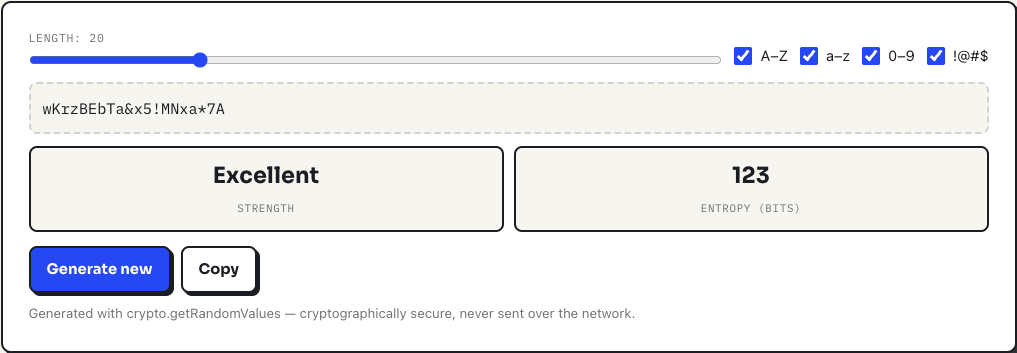
How to generate a password here
- Set the length with the slider. It runs from 6 to 64 characters and starts at 20, which is a sensible default for anything that matters.
- Tick or untick the four character classes: uppercase, lowercase, digits, and symbols. The password regenerates instantly every time you change anything.
- Click Generate new until you get one you like, then hit Copy and paste it straight into your password manager.
If a site rejects symbols, untick the !@#$ box and regenerate. The entropy readout will drop a little, which you can offset by dragging the length up a few characters.
A worked example
Leave everything at the defaults: 20 characters with all four classes on. The character pool is 70 characters, so each character contributes about 6.13 bits of randomness, and the entropy readout shows 123 bits with a strength of Excellent. Now untick symbols and digits and drop the slider to 12. The pool shrinks to 49 letters, entropy falls to 67 bits, and the rating drops to Good. That gap is the whole argument for length: four extra characters buy you more security than any amount of clever symbol substitution.
What is actually happening under the hood
Every random draw comes from crypto.getRandomValues, the browser's cryptographic random number generator, not Math.random. The code also uses rejection sampling when mapping random values onto the character pool, which removes the subtle modulo bias that naive generators have. Two more details are deliberate. First, one character from every class you selected is guaranteed to appear, then the result is shuffled with a Fisher-Yates pass so those guaranteed characters do not cluster at the front. Second, the character sets quietly exclude lookalikes: no capital I or O, no lowercase l, no 0 or 1. You give up a sliver of entropy for passwords you can actually read back over the phone or type from a screen, and having typed hundreds of these into hotel Wi-Fi portals, I consider that trade a bargain.
Nothing is transmitted. The page has no network call in the generation path at all. You can load it, switch on airplane mode, and keep generating.
Honest limitations
The strength meter measures the randomness of what this tool produced, not the strength of a password you invent and imagine typing in. It has no dictionary check because it never needs one: the output is uniformly random, so there is nothing dictionary-like to catch. The excluded lookalike characters mean the theoretical maximum entropy is slightly below a generator that uses all 94 printable ASCII characters; at 20 characters the difference is a few bits and irrelevant in practice. And the symbol set is a fixed 13 characters (!@#$%^&*-_=+?), so if a site demands some specific symbol outside that set, you will have to add it by hand.
Frequently asked questions
Is it safe to use an online password generator?
This one generates passwords with your browser's built-in cryptographic random number generator (crypto.getRandomValues). The password is created on your device and never transmitted, logged, or stored. You can even load the page, disconnect from the internet, and generate offline.
How long should a password be in 2026?
Use at least 16 characters for important accounts. Length matters more than complexity: a 20-character password of mixed types would take modern hardware billions of years to brute-force.
Should I use symbols and numbers?
Yes, when the site allows them. Every added character class increases the search space an attacker must cover. If a site rejects certain symbols, just regenerate without them.
How do I remember passwords like this?
You should not memorize them. Use a password manager (the one built into your browser or phone is fine) and store one strong unique password per site.